

A founder sees a strong month, assumes there is room to hire, and approves a new spend. Two weeks later, the bookkeeper finds a $12,000 annual insurance payment booked entirely to the month it was paid. A customer’s prepaid annual contract is also sitting in revenue rather than deferred revenue. The “strong month” was not real. A month-end close checklist is what catches this before the decision gets made.
This happens because a bank reconciliation can be clean while the financial statements are still wrong. QuickBooks Online can tell you whether transactions match the bank. It cannot, on its own, tell you whether income and expenses belong in the right month.
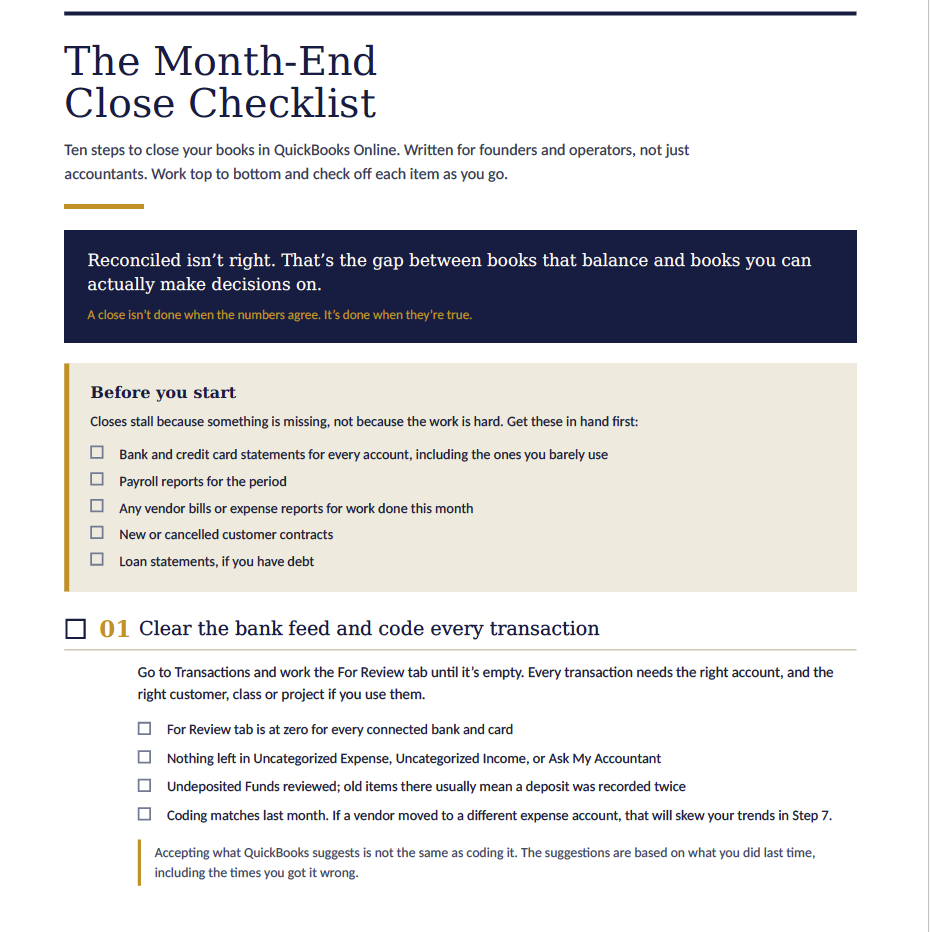
Download the free Month-End Close Checklist (PDF). No form, no email required. It is built for founders and operators using QuickBooks Online, not just accounting teams.
A reconciled account is not necessarily an accurate account
Reconciling means the ending cash or credit card balance in QuickBooks agrees with the statement. That is necessary. It is not the finish line.
A month-end close is the process of confirming that the financial statements reflect what actually happened during the month. That requires more than matching transactions. It requires reviewing where transactions were coded, recording activity that has not hit the bank yet, and proving the balances on the balance sheet.
The distinction matters because your profit and loss statement only includes amounts someone chose to put into revenue or expense. Other transactions may sit on the balance sheet for months without drawing attention.
For example:
-
- A prepaid expense that is never amortized makes expenses too low and profit too high.
-
- Customer cash recorded as revenue before services are delivered makes the current month look better than it is.
-
- An accrued expense that does not reverse can cause the same vendor cost to be counted twice.
-
- A loan payment coded entirely to expense can overstate costs, because part of each payment may reduce principal rather than represent interest expense.
The books can balance through all of this. The numbers can still lead you to make the wrong decision.
Use a repeatable ten-step close, not a last-minute review
A good QuickBooks month-end close checklist creates a sequence: collect documents, clear and code bank activity, reconcile cash and cards, review what customers owe and what you owe vendors, post adjusting entries, reconcile the balance sheet, investigate unusual movements, review the financials, and lock the period.
The order matters. You cannot meaningfully review the P&L while transactions are still uncategorized or customer payments are sitting in the wrong place.
Start with the basic inputs. Have bank and credit card statements, payroll reports, loan statements, vendor bills, expense reports, and new or cancelled customer contracts available before close begins. Missing documents, not hard accounting, are usually what turn a two-day close into a two-week chase.
In QuickBooks Online, work the For Review tab until it is empty for every connected bank and card account. Do not accept suggested categories without checking them. QuickBooks learns from prior entries, including prior mistakes.
Also investigate balances in Undeposited Funds. This account is useful when several customer payments are combined into one bank deposit. But old items often signal a duplicated deposit, an unapplied payment, or a transaction that was never completed correctly. Clear out Ask My Accountant, Uncategorized Expense, and Uncategorized Income before treating the period as closed. Those accounts are placeholders, not final answers.
Then reconcile each bank account and credit card to its actual statement, not merely to the bank feed. The bank feed is a convenience; the statement is the record. Do not force a reconciliation difference to make the screen show zero. A forced adjustment may close the reconciliation while leaving an unexplained error in the books.
Adjusting entries put activity in the month where it belongs
Adjusting entries are where bookkeeping becomes financial reporting. They account for timing differences between cash movement and economic activity.
The core question is simple: When was the income earned, or when was the expense incurred? That date, rather than the payment date, should drive the P&L.
Prepaid expenses
Say you pay $12,000 in February for a twelve-month insurance policy. If you book the full $12,000 to Insurance Expense in February, February looks worse than it should and the following eleven months look better than they should.
Instead, record the initial payment as a prepaid asset. Then recognize $1,000 of insurance expense each month:
Monthly entry
Debit: Insurance Expense        $1,000
Credit: Prepaid Insurance       $1,000
At the end of April, the balance sheet should show $9,000 remaining in Prepaid Insurance. That number needs a schedule behind it: vendor, coverage period, monthly amount, amount released to date, and remaining balance.
A recurring journal entry can help automate this. But automation needs monitoring. A recurring entry that silently stops running leaves the prepaid balance unchanged and overstates profit month after month.
Deferred revenue
Now consider a customer that pays $24,000 in advance for a year of service. You have the cash, but you have not earned all of the revenue yet. Recording the full amount as revenue in the first month inflates current performance and understates revenue in future months.
If the agreement is earned evenly over twelve months, release $2,000 each month:
Monthly entry
Debit: Deferred Revenue         $2,000
Credit: Revenue                 $2,000
Deferred revenue should tie to a contract schedule. That schedule should show each active contract, its service period, cash or invoice amount, revenue recognized through the close date, and revenue remaining to earn.
Setup and implementation fees may follow a similar pattern, but the appropriate timing can depend on the contract terms and the work performed. If the treatment is unclear or material, get a second opinion before establishing the policy.
Accrued expenses
Accruals capture costs you incurred before receiving the bill. If a consultant completed $5,000 of work in March but will invoice on April 12, the cost belongs in March.
At March 31, record:
Debit: Consulting Expense       $5,000
Credit: Accrued Liabilities     $5,000
Then reverse the accrual on April 1. When the actual vendor bill arrives, it can be entered normally without double-counting the expense.
This reversal is not optional housekeeping. It is a control. An accrual that never reverses is a common reason a company carries stale liabilities and duplicate expenses.
Reconcile the balance sheet, one account at a time
The most valuable part of the close is usually the part that gets skipped: balance sheet reconciliation.
To reconcile a balance sheet account means you can show what makes up the number and prove it is correct. A balance sheet account without support has not been reconciled. It has been assumed.
Cash should tie to bank reconciliations. Accounts receivable should tie to the A/R Aging Summary. Review invoices over 90 days, negative customer balances, and unapplied payments. If an invoice is unlikely to be collected, reported revenue may not be as solid as it appears.
Accounts payable should tie to the A/P Aging Summary. Look for negative vendor balances, duplicate payments, and bills for work completed during the month that have not been entered.
For the other accounts, build simple workpapers:
-
- Prepaids tie to an amortization schedule.
-
- Fixed assets tie to a list of equipment or other assets you own, plus a depreciation schedule.
-
- Credit card and loan balances tie to statements.
-
- Deferred revenue ties to contract-level revenue schedules.
-
- Payroll liabilities tie to payroll reports.
-
- Accrued liabilities tie to a list of the estimates booked and their planned reversal dates.
A spreadsheet is sufficient. The point is not a polished template. The point is that another person can open it, see the source of each balance, and understand why it changed.
After the reconciliations are complete, read the P&L and balance sheet by month. Investigate material changes: an expense line that drops to zero, a sharp gross-margin movement, revenue that conflicts with sales activity, or a balance sheet account that has not moved in months. Set a review threshold in advance, such as items over 10% or a dollar amount meaningful to your business.
The four ways month-end closes fail
Most close problems are process failures, not QuickBooks problems.
First, nobody owns the balance sheet. Cash gets reconciled because the bank statement makes it obvious. Prepaids, accruals, debt, and deferred revenue need a named owner and a supporting schedule.
Second, recurring entries silently stop running. Review recurring templates and scan for accounts that have stayed flat when they should change, especially prepaids, depreciation, deferred revenue, and payroll accruals.
Third, nobody reviews the reviewer. The person preparing the close should not be the only person reading the results. A founder, controller, or outside advisor should review the financial statements, material journal entries, and reconciliation support.
Fourth, the close has no deadline. Set one. A practical target for a small company is a preliminary close within several business days of month-end, followed by review and a final close date. Once the period is final, use a closing date password in QuickBooks Online so prior periods cannot be changed casually.
A clean close gives you more than tidy books. It gives you a P&L and balance sheet you can use to decide when to hire, how much to spend, and what the business can actually afford.
Download the Free Checklist (PDF)
If your close takes three weeks or nobody is reviewing the balance sheet, talk to Resolve Works. (612) 293-9368 | resolve-works.com
